•
•
How to Build a Forex Broker Website That Converts Traders
Most forex broker websites look the part. Few are built to convert.
The gap isn’t your design budget—it’s architecture and intent. A high-converting forex broker website isn’t a digital brochure with a “Sign Up” button bolted on. It’s a structured funnel that moves visitors through registration → KYC → first deposit → active platform usage, with measurable drop-off points at every stage.
Traders make credibility judgments in seconds. If your homepage doesn’t immediately communicate who you are, what you offer, and why you can be trusted, they’ll leave—often for a competitor who answered those questions faster. That means clarity, trust, and performance aren’t “nice UX.” They’re conversion features.
This guide gives you a step-by-step framework for building a forex broker website that earns—and converts—qualified traffic, not just visits.
Step 1: Define “Conversion” for Your Brokerage
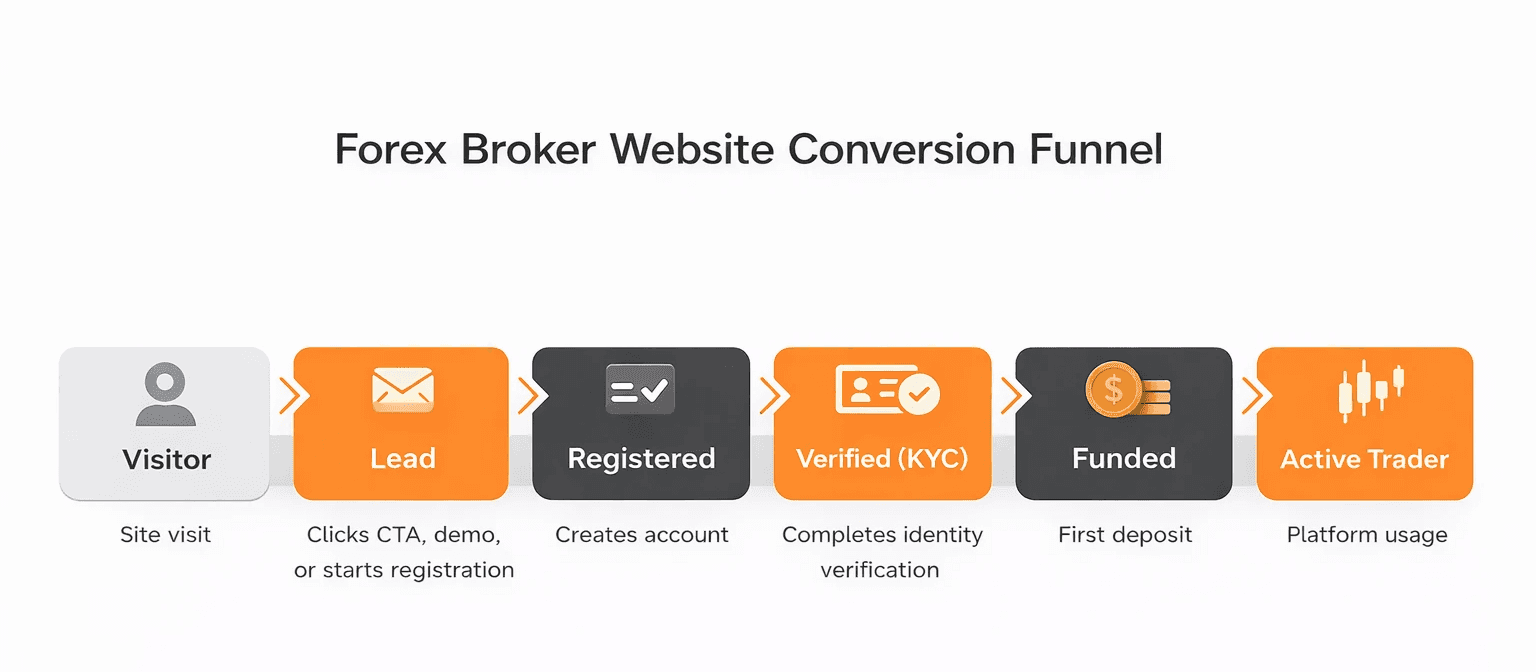
A converting broker website moves users from interest → registration → verification → first deposit with minimal friction.
Before you design a single page, define what “conversion” actually means for your business—and how you’ll measure it. For most brokerages, the funnel looks like this:
Visitor → Lead: clicks a CTA, requests a demo, or starts account registration
Lead → Registered user: completes account creation
Registered → Verified: completes KYC/identity verification
Verified → Funded: makes a first deposit
Funded → Active: logs into the platform and executes a trade
Each stage is a conversion event—and each has a measurable drop-off rate. The KPIs to track from day one include:
Registration conversion rate (unique visitors → registration starts)
KYC completion rate (registrations → verified accounts)
First deposit conversion rate (verified accounts → funded accounts)
Platform download / login click-through
IB/partner application conversion rate (if you run an Introducing Broker or affiliate program)
Without these defined upfront, you can’t diagnose where your forex brokerage website is underperforming—or what to fix first.
Step 2: Build a Conversion-First Site Structure
A forex broker website should be organized around trader decision-making, not your internal org chart.
Every page should answer a specific question a trader is asking at that stage of evaluation. Here’s a recommended architecture:
Core Conversion Pages
Page | Trader question |
|---|---|
Homepage | What do you offer, and can I trust you? |
Account Types | Which account is right for me? |
Trading Conditions | What will it actually cost? |
Platforms | What tools will I trade with? |
Funding | How do I deposit and withdraw? |
Onboarding / How to Start | What’s the sign-up process, and how long does it take? |
Trust & Proof Pages
Regulation / Licenses (jurisdiction-specific, clearly written)
Security of Funds / Client Protection (transparency over promises)
About / Company (real operational context—not a generic corporate history)
Contact + Support
Scale Pages (add over time for SEO and retention)
Education hub, glossary, market commentary
Partners / IB program
Blog / News
The architecture rule: every key page earns its place by answering exactly one trader question. Pages that try to answer everything end up answering nothing.
Step 3: Design the Homepage Above the Fold as a Conversion Unit
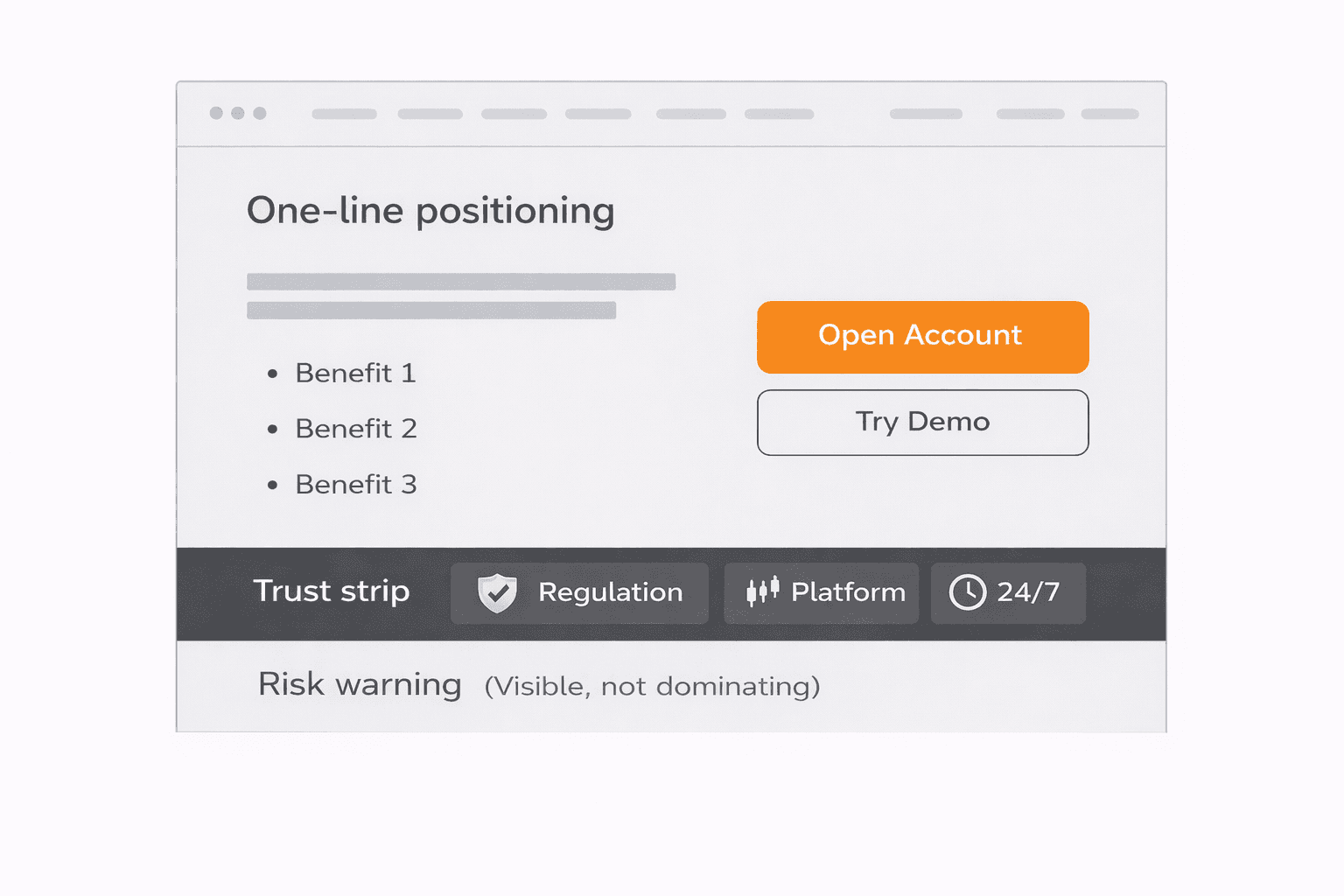
The above-the-fold section of a high-converting forex broker website has one job: give a trader enough information in five seconds to decide whether to stay.
A repeatable above-the-fold checklist:
✅ One-line positioning — who the platform is for and what makes it different. Be specific. “Institutional-grade execution for active retail traders” beats “World’s Best Broker.”
✅ 2–3 benefit statements tied to real trader outcomes: execution speed, tools, pricing transparency, support availability
✅ Trust strip — regulatory status (only where applicable), years operating, platform logos, support hours
✅ Primary CTA + secondary CTA — e.g., “Open Account” (primary) and “Try Demo” (secondary). Don’t force traders to choose between too many actions.
✅ Risk warning placement — visible and compliant, without visually dominating the value proposition
What to avoid: stock photos of charts and skylines, vague superlatives (“leading,” “trusted,” “award-winning” with no evidence), and a wall of registration fields before trust has been established.
Step 4: Build Trust Signals That Actually Move Traders to Register
Trust in forex broker website design isn’t a badge dump—it’s a consistent pattern of evidence and transparency across every page.
Transparency patterns that build credibility:
Clear spreads and commissions on the Trading Conditions page—ideally by account type. If you show ranges, label them precisely and explain what drives variance.
Deposit and withdrawal timelines stated clearly, with fee disclosures
Verification steps outlined before a user starts registration
Social proof patterns (only if verifiable):
Real trader testimonials with attribution and context
Volume/client numbers only where supported by data
Industry awards or recognition—with source and year
Content quality signals:
Real platform screenshots—not generic mockups
Step-by-step visuals for onboarding and funding
Visible team presence or named support ownership (where appropriate)
Performance as a trust signal:
Traders expect a platform-level experience from the first click. Slow load times, layout shifts, and laggy interactions don’t just hurt UX—they undermine credibility. Treat Core Web Vitals (LCP, CLS, and INP) as launch criteria, not a “nice-to-have” for later.
Step 5: Reduce Onboarding Friction Without Sacrificing Compliance
The trader onboarding funnel is where many broker websites leak the most value. The form is live, traffic is arriving—but KYC completion rates are low and nobody knows why.
Practical UX tactics to reduce friction in your KYC onboarding flow:
Set expectations upfront: “Verification takes ~10 minutes. You’ll need a government-issued ID and proof of address.” Surprises cause abandonment.
Progressive disclosure: Don’t front-load every field. Collect what you need step-by-step—basic details first, then financial info, then document uploads.
Form UX fundamentals: inline validation, clear error messages, save-and-continue for multi-step flows, and mobile-first field design (thumb-friendly inputs, camera-enabled uploads)
Reassurance microcopy at friction points: “Why we need this,” “How we store your data,” and realistic verification timelines—placed at the moment of hesitation (not buried in a footer)
Compliance note: KYC requirements vary significantly by jurisdiction and regulatory status. The above are UX principles only. All onboarding flows should be reviewed by qualified legal and compliance professionals before launch.
Step 6: Build Dedicated Landing Pages for Paid and Affiliate Traffic
Sending PPC or affiliate traffic to your homepage is one of the most common—and most expensive—conversion mistakes in forex broker website development.
A homepage supports multiple audiences and journeys. A forex broker landing page should be built for one audience, one offer, and one action.
What a high-performing broker landing page typically includes:
Offer clarity: what account type, promotion, or conditions apply to this traffic source
Conditions summary: key spreads, leverage, platforms—scannable, not a data dump
Trust proof: regulatory status, support, security (compressed)
Single CTA: one primary action, minimal navigation distractions
FAQ block: answers the 3–5 most common objections for that segment
Compliant risk disclosure: required, correctly formatted for the jurisdiction
Regional and traffic-source variations to consider:
Language and deposit method localization (e.g., a SEPA-heavy message won’t convert well in regions where card/wallet rails dominate)
Jurisdiction-specific disclosures (ensure the correct entity + disclaimers for where the ad ran)
UTM tagging and CRM routing so every lead is attributed and followed up appropriately
High-intent traffic converts best when the landing experience matches intent. In most cases, the homepage becomes a conversion leak for affiliate and paid traffic. Purpose-built landing pages close it.
Step 7: Choose a Platform and Stack That Supports Speed, Updates, and Integrations
The right CMS for a forex broker website isn’t the one with the most features—it’s the one your team can ship updates on without a developer ticket for every copy change.
CMS criteria that matter for brokerages:
Fast publishing for conditions updates (spreads, leverage, instrument lists change)
Multilingual/localization support without duplicating your entire architecture
Strong SEO controls (canonicals, metadata, structured data)
Integration-friendly: CRM, live chat, analytics, email automation
Integrations that typically matter for a conversion-ready broker:
CRM (all forms routed with UTMs captured)
GA4 + Google Tag Manager (event tracking for each funnel step)
Live chat (pre-registration conversion support)
Email/SMS flows (onboarding reminders, KYC nudges, deposit prompts)
KYC/verification API (if verification is embedded on-site vs. a separate portal)
Trading platform presentation:
MT4/MT5 access, cTrader availability, and web/mobile platform options should each have clear page space. Traders want to know what they’ll use before they sign up. Platform pages should include feature highlights, device compatibility, real screenshots, and a direct download/demo CTA.
Step 8: Instrument Analytics Before Launch—Not After
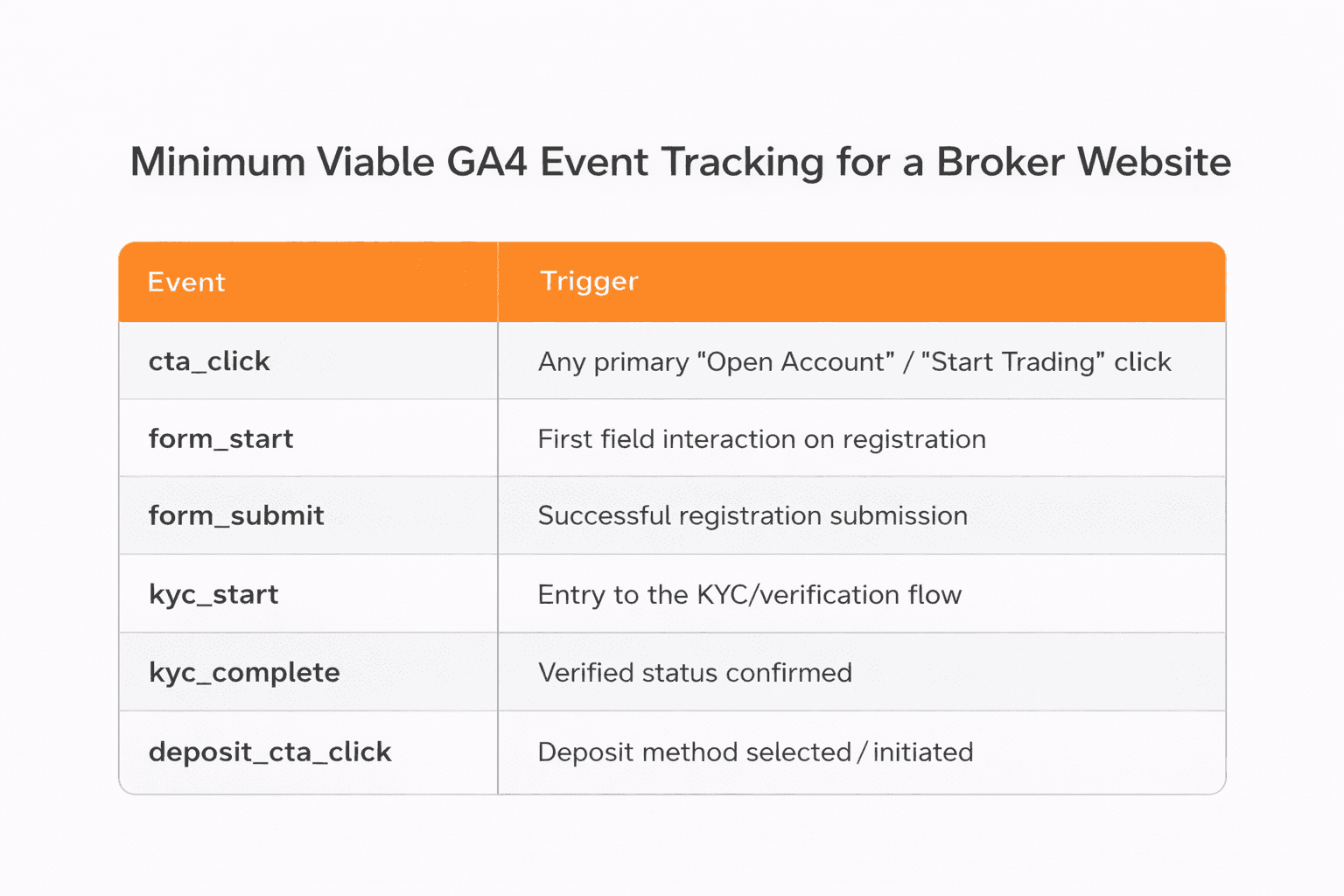
Broker website analytics built on GA4 and Google Tag Manager give you funnel visibility to optimize conversion systematically. Without them, you’re running campaigns and making UX decisions without a feedback loop.
Minimum viable tracking plan for a forex broker website:
Event | Trigger |
|---|---|
| Any primary “Open Account” / “Start Trading” click |
| First field interaction on registration |
| Successful registration submission |
| Entry to the KYC/verification flow |
| Verified status confirmed |
| Funding page viewed |
| Deposit method selected / initiated |
Funnel reporting: Segment by source/medium, geography, and device. What looks like a minor drop overall can hide a major abandonment issue on mobile, in a specific region, or from a specific acquisition channel.
CRO tooling: Layer heatmaps and session recordings (e.g., Hotjar or Microsoft Clarity) onto your highest-traffic pages to see what users interact with, ignore, and abandon.
The cadence: ship v1 with tracking live → review funnel data in week 2 and week 4 → identify the highest-leverage drop-off → test one change → measure → repeat.
Step 9: SEO and Multilingual Strategy for Broker Websites
A multilingual forex website is not a translation project—it’s a localization project.
Translated copy with the wrong deposit methods, the wrong regulatory disclosure, or the wrong support expectations creates a trust gap no amount of design polish will fix.
SEO content clusters that work for brokerages:
“How to start trading” guides (bottom-funnel intent)
Platform tutorials and comparisons
Glossary terms (pip, spread, leverage, margin)
Fees and conditions explainers
Funding and withdrawal guides
For AI search visibility (GEO): Structure content with clear definitions, direct answers in the first sentence of each section, and FAQ blocks. AI systems pull section-level answers—so your H2s should match real trader questions, not clever marketing labels.
DIY Templates vs. Professional Forex Broker Website Design
Scenario | DIY may work | Specialist agency recommended |
Validating demand with 1–3 pages | ✅ | |
Relying on paid/affiliate traffic from launch | ✅ | |
Multi-page architecture + localization | ✅ | |
Multiple jurisdictions / complex compliance constraints | ✅ | |
Need measurable funnels from day one | ✅ | |
Simple setup with strong internal compliance support | ✅ |
The honest answer: if conversion efficiency matters—because you’re paying for traffic or competing in a crowded market—conversion-first architecture and measurement usually outperform templates over time.
Common Mistakes That Kill Broker Website Conversion
Unclear or hard-to-find trading conditions — traders who can’t find your spreads assume the worst
Long, undivided registration forms with no progress indicator or save-and-continue
Generic visuals and vague “best broker” claims — these reduce trust with skeptical traders
Weak funding page — payment methods, fees, and timelines are high-intent information that influences deposits
Launching without event tracking — you can’t optimize a funnel you can’t see
Sending all traffic to the homepage — intent mismatch leaks paid and affiliate traffic
Pre-Launch Checklist for a Conversion-Ready Forex Broker Website
Page speed QA — Core Web Vitals targets met on mobile and desktop
All GA4/GTM events tested and firing correctly
Forms routed to CRM with UTM parameters captured
Compliance pages present and reviewed (risk warnings, regulatory disclosures, legal)
Core pages complete: Conditions, Funding, Platforms, Onboarding/KYC
Live chat and support channels verified and responsive
SEO basics: titles, meta descriptions, canonicals, sitemap
Mobile UX reviewed across major screen sizes and OS versions
Next Steps
Building a forex broker website that converts requires more than a design brief. It requires conversion architecture, tracking infrastructure, and a launch-and-iterate mindset based on real funnel data.
WSA specializes in conversion-first website design for fintech and brokerage businesses—from site architecture and onboarding UX to analytics setup and post-launch optimization. If you’re building a new broker website or redesigning an existing one, explore our work or book a discovery call to talk through your requirements.
FAQ
What pages does a high-converting forex broker website need?
At minimum: Homepage, Account Types, Trading Conditions, Platforms, Funding/Deposits, and an Onboarding/How to Start page. Add Regulation/Licenses, About, and Contact as trust anchors. For long-term growth, education content, a glossary, and an IB/partners page can compound SEO value over time.
How do I increase registrations on my forex broker website?
Focus on three levers: reduce friction on the first registration step (fewer fields, better UX), add trust signals above the fold (regulatory clarity, client protection info, real platform visuals), and make sure your primary CTA goes directly to account creation (not a vague “learn more” path). Once baseline traffic is steady, A/B test headline and CTA copy.
How do I reduce KYC drop-off without creating compliance risk?
Set expectations before users begin (“This takes about 10 minutes”), use progressive disclosure, add reassurance microcopy at document upload moments, and enable save-and-continue—especially for mobile users. Always have the final flow reviewed by compliance before launch.
How fast should a forex broker website load?
Core Web Vitals targets are a strong baseline: LCP under 2.5 seconds, CLS under 0.1, and INP under 200 ms. For broker websites, speed isn’t just technical—it’s trust. Aim to meet these targets on mobile as a launch requirement, not a post-launch improvement.
How do I track sign-ups, KYC completion, and deposits in GA4?
Use Google Tag Manager to fire GA4 events at each milestone—form_start, form_submit, kyc_start, kyc_complete, and deposit_cta_click. Then build a funnel exploration report in GA4 using those events as steps, segmented by source/medium and device category.
Which trading platforms should I mention on my broker website (MT4/MT5/cTrader)?
Feature whichever platforms you actually offer—commonly MT4, MT5, cTrader, and/or a proprietary web/mobile platform. Each deserves a dedicated section or page with key features, device compatibility, real screenshots, and clear download/demo CTAs. Traders often evaluate the platform before the broker, so platform pages can also be a strong organic entry point.
Launch Your Licensed Brokerage with Confidence
We support brokers and fintechs through licensing, launch planning, and everything a regulated brand needs to go live.