•
•

Core Web Vitals for Fintech: How Website Speed Impacts Trust & Conversions
Before a user reads your headline, checks your rates, or clicks “Open an account,” they’ve already formed a first impression — and a significant part of it comes from how your website feels.
In most industries, a slow page is an annoyance. In fintech, it’s a credibility problem. People don’t hand over bank details, ID documents, or investment capital to a brand that feels unreliable — and a janky, slow-loading experience signals exactly that, even when your product is sound and your compliance is airtight.
That’s why Core Web Vitals for fintech aren’t just an SEO checkbox. They’re a trust-and-conversion system that directly affects whether paid traffic converts, whether users complete KYC, and whether acquisition costs stay manageable as you scale.
Here’s what they are, why they matter in financial contexts, and what to do about them.
Key Takeaways
Core Web Vitals (CWV) are Google’s three core UX metrics measuring loading speed (LCP), responsiveness (INP), and visual stability (CLS) — and Google assesses them using real-user (field) data, not just lab tests.
Google evaluates pass/fail using field data, aggregated at the 75th percentile across real sessions — not your Lighthouse score.
In fintech, speed is a trust signal. Slow or unstable pages during account opening, KYC flows, or pricing review can reduce form completion rates.
INP replaced FID as the responsiveness metric on March 12, 2024. If your team is still tracking FID, you’re measuring the wrong thing.
Third-party scripts — consent banners, fraud detection tools, tag managers, and live chat — are among the biggest CWV killers on fintech sites and require active governance, not just one-time audits.
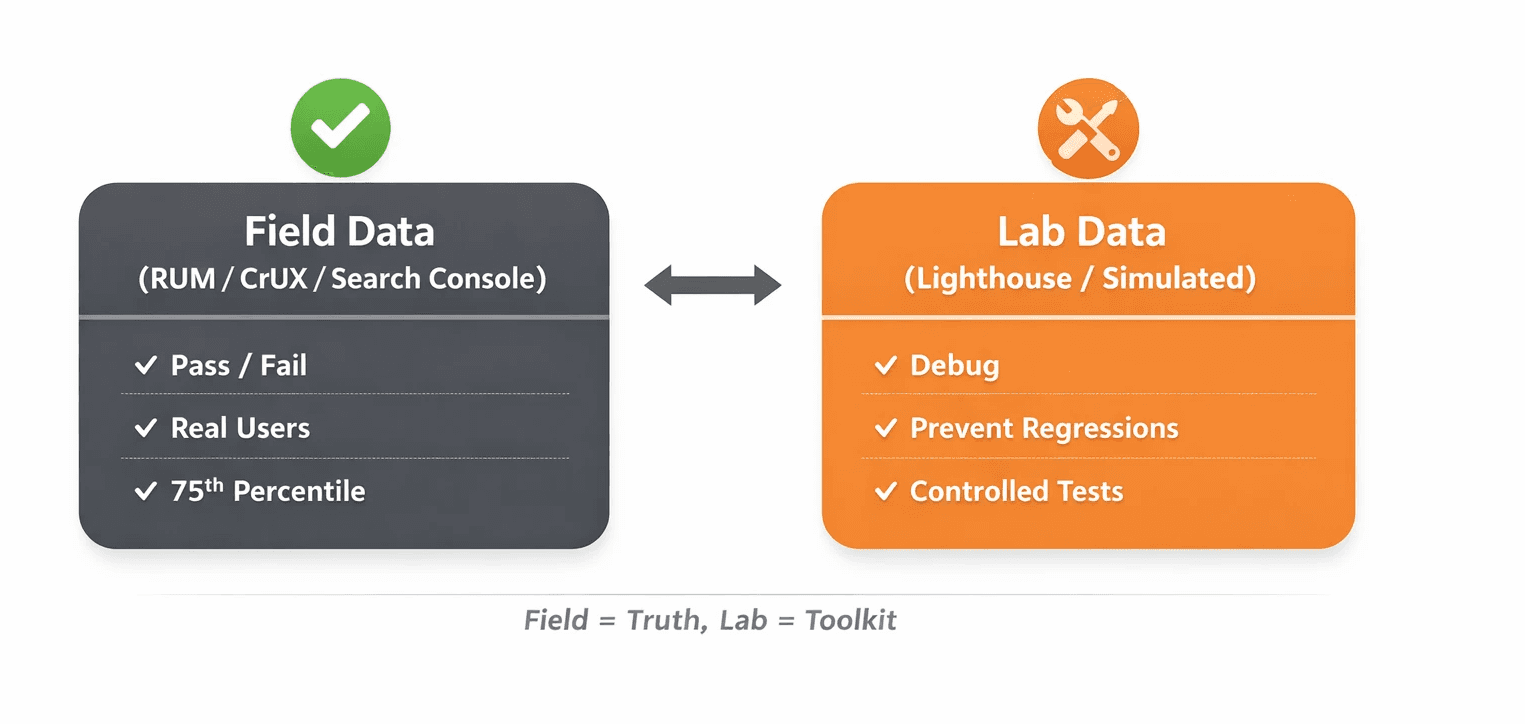
Field data and lab data serve different purposes. Use field data to judge real-world performance; use Lighthouse and lab tools to diagnose issues and prevent regressions.
A structured performance roadmap — not random micro-optimizations — is how fintech teams improve CWV without breaking tracking, compliance UI, or security integrations.
What Are Core Web Vitals (and What Changed Recently)?
Core Web Vitals are Google’s standardized metrics for measuring real-user page experience across three dimensions: loading, interactivity, and visual stability.
Introduced as a Google Search ranking signal in 2021, CWV have evolved since launch. The most important recent change: Interaction to Next Paint (INP) officially replaced First Input Delay (FID) as the responsiveness metric on March 12, 2024. If your reporting still references FID, it’s no longer part of the Core Web Vitals assessment.
The three current metrics are:
Metric | What It Measures | Good | Needs Improvement | Poor |
|---|---|---|---|---|
LCP (Largest Contentful Paint) | How fast the main content loads | ≤ 2.5s | 2.5s – 4.0s | > 4.0s |
INP (Interaction to Next Paint) | How fast the page responds to clicks, taps, typing | ≤ 200ms | 200ms – 500ms | > 500ms |
CLS (Cumulative Layout Shift) | Visual stability — does content jump around? | ≤ 0.1 | 0.1 – 0.25 | > 0.25 |
One critical detail: Google determines whether a URL “passes” CWV using the 75th percentile of field data — meaning your experience needs to be good for most real users, not just your team testing on fast devices and office Wi‑Fi. A smooth run on a MacBook in London doesn’t necessarily reflect what a user on a mid-tier Android device in Lagos or São Paulo experiences.
Why Fintech Website Speed Matters More Than in Other Industries
In fintech, users aren’t just browsing — they’re making trust decisions. A slow or unstable website doesn’t just frustrate them; it raises doubt about the entire brand.
Think about what fintech users are being asked to do:
Upload a passport or ID for KYC verification
Enter bank details or connect via open banking
Transfer funds or set up recurring payments
Provide income information for a loan eligibility check
Commit to a trading or investment platform
These are high-stakes, high-friction actions. The trust window — the moment when a user decides whether your brand feels legitimate and competent — is narrow. Every second of delay or visual glitch chips away at confidence.
In this context, fintech website speed becomes a brand signal:
Speed communicates reliability.
Visual stability communicates attention to detail.
Responsive forms communicate competence.
None of this is necessarily conscious reasoning. It’s felt — and in financial decisions, that feeling matters.
This dynamic applies across the full fintech spectrum: account opening at neobanks, crypto exchange registration and verification, wealth platform “book a discovery call” flows, and loan eligibility calculators. In each case, the experience before the action is inseparable from confidence in the action itself.
How Page Speed Affects Conversion Rates in Fintech
Faster experiences reduce friction — and reduced friction increases funnel progression. That pattern shows up repeatedly across categories.
A few reference points worth knowing:
Deloitte and Google research found that even a 0.1-second improvement in mobile load times was associated with meaningful conversion uplifts in categories like retail and travel. The underlying mechanism — reduced abandonment and higher confidence — translates well to financial services.
Vodafone, highlighted in Google’s web.dev case studies, reported a measurable sales lift after improving Largest Contentful Paint.
These aren’t fintech-specific benchmarks, but they’re among the most credible proxies available — and the psychology transfers. In financial categories (which Google classifies under YMYL — “Your Money or Your Life”), the stakes of abandonment are often higher because trust is harder to win back.
For fintech specifically, page-speed impact is most measurable across:
Landing page → sign-up click
Sign-up page → completed submission
KYC step 1 → full KYC completion
Pricing/fees page → primary CTA click
App store landing → app download
Which Pages Should Fintech Teams Prioritize First?
Start with the pages where speed failures cost money — not just traffic.
Prioritize in this order:
Paid acquisition landing pages — Every millisecond of delay here can inflate your cost per acquisition (CPA). If you’re sending paid traffic to pages with poor CWV, you’re effectively paying to lose people.
Sign-up and account opening flows — High intent, high drop-off risk. These pages deserve their own CWV measurement, not just the homepage.
KYC and verification steps — Often the most technically heavy (file uploads, identity checks, reCAPTCHA) and the most performance-neglected.
Pricing and fees pages — High-intent research pages where CLS issues (rates ticking, content shifting) undermine confidence at a critical decision moment.
Product pages (cards, accounts, loans, investment products) — Where SEO traffic lands and forms a first impression.
Blog and education content — Lower urgency, but important for organic acquisition and brand trust over time.
Important: Measure mobile and desktop separately. If you serve international markets, segment by geography — network conditions and device profiles vary significantly by region.
How to Measure Core Web Vitals Correctly: Field Data vs Lab Data
Use field data to judge whether you’re passing; use lab data to diagnose why you’re failing.
This distinction is one of the most common sources of confusion — and wasted effort — in CWV work.
Field data (often called Real User Monitoring, or RUM) captures what actual visitors experience. It’s the basis for Google’s Core Web Vitals assessment in Search Console and is powered by the Chrome UX Report (CrUX), a dataset of anonymized real-user Chrome sessions. PageSpeed Insights field data shows your CrUX data alongside lab results in a single interface.
Lab data — generated by tools like Lighthouse — runs controlled, simulated tests. It’s useful for identifying regressions, validating changes before release, and debugging specific issues. But a 95 Lighthouse score doesn’t guarantee you’re passing CWV in the field. Real users have slower devices, variable networks, and more scripts and browser extensions in play.
Tools to use:
Google Search Console CWV Report — URL-level pass/fail status based on field data
PageSpeed Insights — Combines field (CrUX) and lab (Lighthouse) data per URL
Chrome UX Report / CrUX — Field data accessible via BigQuery or Looker Studio
web-vitals JavaScript library — Embed in your site for custom RUM and in-product monitoring of key flows
LCP: How to Make Key Pages Load Fast Enough to Build Confidence
LCP measures how long it takes for the largest visible content element — often a hero image, headline block, or banner — to render. The “good” threshold is ≤ 2.5 seconds.
Common Largest Contentful Paint (LCP) problems on fintech sites:
Oversized hero images or video backgrounds on landing pages
Render-blocking CSS/JS preventing content from painting early
Slow server response times (TTFB — Time to First Byte), often caused by A/B testing tools, personalization layers, or uncached CMS responses
Unoptimized fonts that delay text rendering
Practical fixes, in priority order:
Convert hero images to WebP or AVIF; compress and size correctly for the viewport
Preload the LCP asset with
<link rel="preload">— for the hero element only, not everythingReduce or inline critical CSS; defer non-critical stylesheets
Improve TTFB with edge caching, a CDN, and backend optimizations
Audit and defer third-party scripts that load above the fold
INP: How to Fix the “Janky” Interactions That Erode Trust
INP measures responsiveness across the entire page visit — every click, tap, and keystroke. The “good” threshold is ≤ 200ms. This is now the Core Web Vitals responsiveness metric, having replaced FID in March 2024.
Understanding what INP is matters because it’s more demanding than FID, which only measured the first interaction. INP reflects the slowest (or near-slowest) interactions users experience during a session. That means a form that starts fast but slows mid-completion — or a button that lags after a consent banner fires — can meaningfully hurt your INP.
Fintech-specific INP risk factors:
Tag manager bloat — every analytics pixel, ad network tag, and conversion tracker adds main-thread pressure
Consent Management Platform (CMP) scripts — often fire in ways that delay interactivity
Fraud detection and bot protection tools (e.g., reCAPTCHA, Arkose Labs) — necessary, but potentially heavy
Live chat widgets — frequently load aggressively, even when unused
A/B testing and personalization tools — synchronous evaluation can block rendering and interaction
INP optimization approach:
Audit and reduce total JavaScript — identify long tasks in Chrome DevTools; remove anything non-essential
Defer non-critical third-party scripts until after the page is interactive (or load only on relevant pages)
Implement tag governance — not every tag should load everywhere; scope by page type and funnel stage
Set a performance budget for growth tooling so new scripts require justification
Review Google’s official INP optimization guide for event-handler and rendering patterns
Ready to improve Core Web Vitals without breaking your compliance setup?
WSA helps fintech brands build performance-first websites that users trust and convert on — from first click through KYC completion.
CLS: Preventing Layout Shifts That Break Trust in High-Stakes Moments
CLS measures unexpected layout shifts — content jumping or moving after it’s rendered. The “good” threshold is ≤ 0.1. In fintech, layout shifts during form-filling or data review can make the interface feel unreliable.
Imagine a user entering their address for KYC and the form suddenly drops two inches because a cookie banner appears. That’s not just annoying — it undermines confidence at exactly the wrong moment.
Common fintech CLS triggers:
Cookie and consent banners injected above the fold
Promotional rate banners or ticker elements that push content down
Late-loading fonts causing text reflow (FOUT/FOIT)
Form validation errors that expand and shift the layout
Images or embedded widgets without declared dimensions
Fixes:
Reserve space for dynamic elements (banners, alerts) using
min-heightbefore they loadDeclare
widthandheighton images, embeds, and iframesUse an intentional font-loading strategy (e.g., preload critical fonts; choose an appropriate
font-display)Design inline validation so error messages occupy reserved space, not newly inserted space
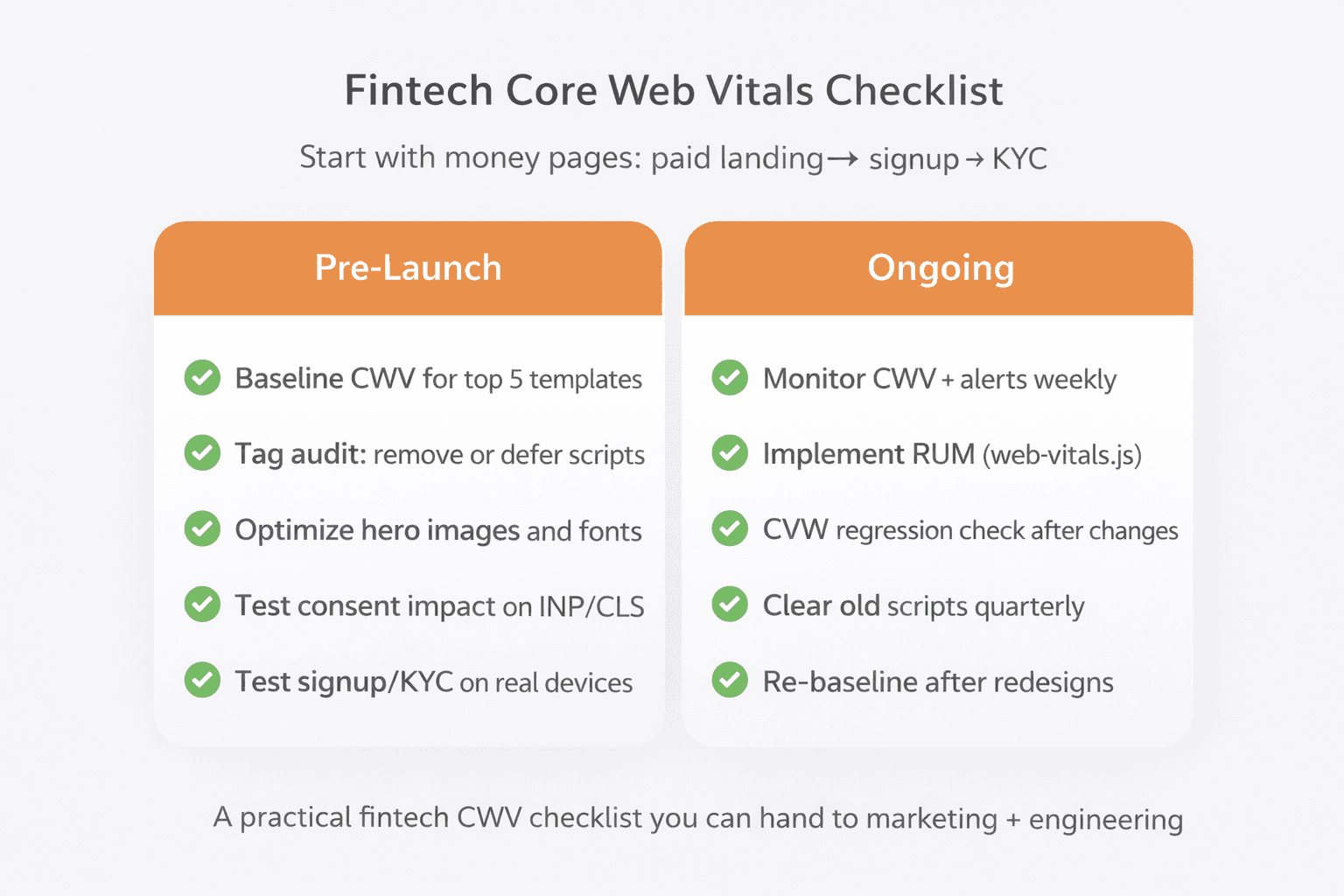
Fintech Core Web Vitals Checklist
Pre-Launch
Establish a CWV baseline for your top 5 page templates (mobile + desktop)
Run a tag audit — remove, defer, or scope scripts by page type
Compress and convert hero/above-fold images to WebP/AVIF with correct dimensions
Test consent banner impact on CLS and INP (on real devices, not just desktop)
Test sign-up and KYC flows on a mid-tier Android device over 4G
Preload the LCP element (hero image or key font) where appropriate
Defer non-critical JavaScript; reduce render-blocking CSS
Define a performance budget for future marketing tag additions
Ongoing
Monitor CWV weekly via Search Console’s CWV report
Implement RUM (web-vitals library or equivalent) for sign-up/KYC funnel pages
Add a CWV regression check after any tag, script, or CMS changes
Run a quarterly third-party script review and cleanup sprint
After any redesign or platform migration, re-baseline field data before declaring success
Common Mistakes Fintech Teams Make with Core Web Vitals
Chasing Lighthouse scores instead of field data — strong lab scores can coexist with weak real-user performance
Only measuring the homepage — sign-up, KYC, and pricing pages often score worse and matter more
Letting the tag manager grow unchecked — every campaign adds pixels; nobody removes them
Shipping consent UI that breaks CLS — compliance is non-negotiable, but compliant UI can still be performance-aware
Ignoring mobile and mid-tier devices — many fintech users aren’t on flagship hardware or fast connections
Treating CWV as a one-time fix — performance degrades over time as scripts, content, and complexity accumulate
Next Steps: Improving Core Web Vitals Without Slowing Growth
If you’re a fintech founder or growth lead, the business case for performance work is straightforward: you’re already paying to acquire users. CWV improvements reduce the percentage of users who abandon before converting — which can lower CAC without increasing spend.
For CTOs and engineering managers: performance work on marketing and onboarding surfaces doesn’t have to compete with product roadmaps. A focused sprint addressing LCP on landing pages, INP through third-party script governance, and CLS from consent/form UI can deliver measurable results with contained scope.
The goal isn’t a perfect score. It’s consistent “Good” field data on the pages that drive revenue — and a process that keeps them there as your product and marketing stack evolves.
WSA works with fintech teams to design and build sites that are fast, conversion-optimized, and compliance-ready — without trading performance for security or credibility for aesthetics. Browse recent fintech and financial services projects to see what that looks like in practice.
FAQ
What are good Core Web Vitals scores?
Google defines “Good” as: LCP ≤ 2.5 seconds, INP ≤ 200ms, and CLS ≤ 0.1. To pass CWV in Google’s reporting, each metric typically needs to be “Good” at the 75th percentile of real-user visits for that URL — meaning it has to be consistently good for most users, not just in a single test run.
Do Core Web Vitals affect SEO for fintech websites?
Yes, but with important nuance. Google includes CWV as part of its Page Experience signals, which can influence ranking. However, content relevance, expertise, and authority (especially for YMYL topics like finance) remain the dominant ranking factors. CWV is best understood as a tie-breaker and a conversion lever — not a shortcut to rankings. Improving Core Web Vitals SEO performance is most impactful when combined with strong content and E‑E‑A‑T signals.
What’s the fastest way to improve LCP on a fintech landing page?
In order of typical impact: (1) optimize and compress the hero image, switch to WebP or AVIF, and declare explicit dimensions; (2) preload the LCP element where appropriate; (3) reduce render-blocking scripts and CSS above the fold; (4) improve server response time (TTFB) via CDN caching; (5) defer heavy third-party scripts that load synchronously.
Why did Google replace FID with INP?
FID (First Input Delay) only measured the delay before the first user interaction on a page. It didn’t capture responsiveness throughout the session — which is where most real-world slowness happens. INP (Interaction to Next Paint) measures responsiveness across all interactions and reflects the slowest (or near-slowest) interaction delays users experience. Google officially replaced FID with INP on March 12, 2024, making it a more accurate measure for script-heavy pages like those common in fintech.
Which tools should we use to monitor Core Web Vitals over time?
Start with the Search Console Core Web Vitals report for URL-level field data at scale. Use PageSpeed Insights for per-URL checks that combine field (CrUX) and lab (Lighthouse) data. For deeper funnel monitoring (e.g., tracking performance through your KYC flow), implement the web-vitals JavaScript library as a lightweight RUM solution. The Chrome UX Report (CrUX) via BigQuery or Looker Studio is useful for historical trend analysis across your domain.
Can Webflow, Framer, or modern site builders pass Core Web Vitals for fintech?
Yes — but the platform is only part of the answer. Webflow and Framer can produce reasonably optimized output, but CWV outcomes depend heavily on what you add: large assets, custom code, third-party embeds, consent tools, and analytics tags all affect real-user performance. Fintech sites built on these platforms can consistently pass CWV with strong asset optimization, script governance, and CLS-aware UI design. The platform sets the ceiling; implementation discipline determines where you land.
Launch Your Licensed Brokerage with Confidence
We support brokers and fintechs through licensing, launch planning, and everything a regulated brand needs to go live.