•
•

How to Choose a Webflow Development Agency: Complete Guide
You shortlisted three agencies. All three have slick portfolios, glowing testimonials, and confident sales decks. Six months after launch, your "winner" has left you with a site your marketing team can't update without a developer, a CMS no one can explain, and a support inbox that goes quiet.
That outcome is common, and it's avoidable. Learning how to choose a Webflow development agency is less about who has the prettiest homepage and more about what you can actually verify before you sign. The agencies look identical from the outside. The difference shows up after launch.
This guide gives you eight criteria you can check, the red flags that predict trouble, and the exact questions to ask before you hire a Webflow developer or agency.
Key Takeaways
Webflow agencies look the same from the outside, the real differences appear after launch in CMS structure, performance, and how easily your team can maintain the site.
Evaluate the backend, not just the homepage: ask to see a live project's CMS collections and class structure, not only the finished visuals.
A Webflow Partner/Expert badge is a useful signal but a floor, not a guarantee. Strong teams also prove expertise through portfolio and delivery.
Treat the discovery call as a two-way test: how an agency handles your hardest technical question predicts the whole engagement.
Transparent scope, a realistic timeline, and a clear revision policy protect you from the three most common failure modes: technical debt, scope creep, and post-launch abandonment.
Use a written checklist of 12 questions so you compare agencies on the same basis, not on sales charisma.
Why Agency Selection Makes or Breaks a Webflow Project
Picture the site that looks fine on day one and falls apart on day ninety. The homepage is beautiful. Then your team tries to add a case study, and the CMS has no collection for it. A developer hard-coded each page by hand.
That is what a weak Webflow development agency actually costs you. Not at launch, but every week afterward.
Webflow has a low barrier to entry. Someone can watch a few tutorials, drag elements into place, and publish something polished. Underneath, the structure can be a tangle of unplanned classes ("div soup") with no real thought given to performance, accessibility, or how content scales. A pretty portfolio screenshot tells you nothing about any of that.
Not All Webflow Agencies Are Equal
Some agencies are design-first: the site looks striking, but the CMS is disorganised and the code is messy. Others are development-first: technically clean, visually generic. A small number do both well, and those are the ones worth your shortlist.
Here's where most buyers lose: they evaluate agencies on the work they can see, when the things that matter most are the things they can't see from the front end.
What a Bad Choice Actually Costs You
A poor choice rarely announces itself. It shows up as a site you outgrow in 12 to 18 months and have to rebuild, paying twice for one website.
Hiring an under-budget agency usually means an under-budget result. The cheaper path costs more once you factor in the redo. Knowing how to evaluate a Webflow agency upfront is the cheapest insurance you'll buy on the whole project.
8 Criteria to Evaluate a Webflow Development Agency
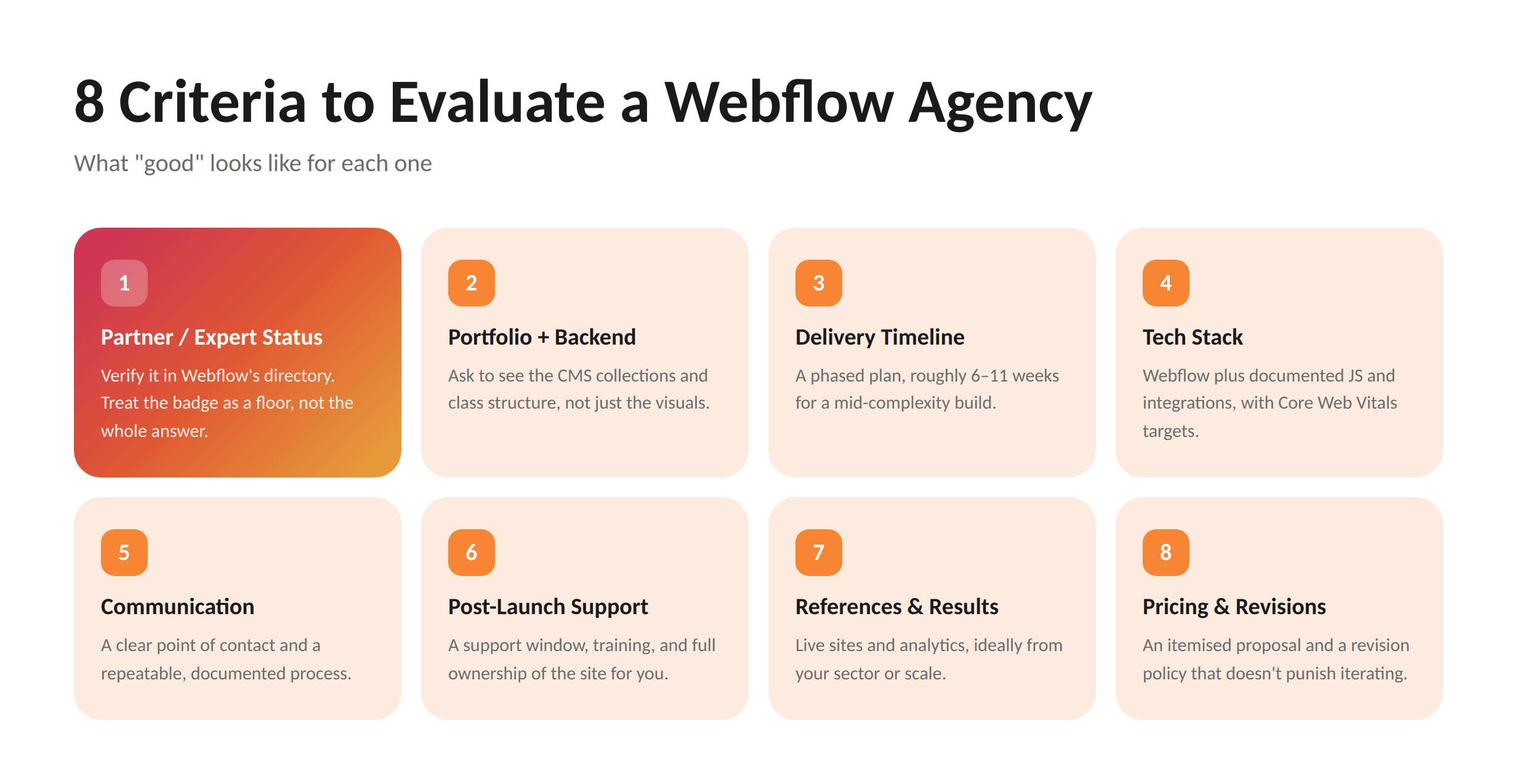
Evaluating a Webflow agency comes down to eight things you can actually check:
1. Webflow Partner / Expert Status
A Webflow Partner or Expert badge tells you Webflow has reviewed the team's work against its own standards for structure, performance, and quality. To verify it, search the official Webflow Certified Partners directory, don't take a logo on a homepage at face value.
The Webflow Partner Program runs on four tiers (Practitioner, Expert, Certified Partner, and Premium/Enterprise Partner) and has existed since 2017 (originally the "Experts" program, renamed the Certified Partner Program in 2024), according to Webflow's Help Center.
Treat the badge as a floor, not the whole answer. It's a genuine signal of platform fluency. But plenty of strong teams demonstrate Webflow expertise through their portfolio and delivery rather than a directory listing, so a missing badge isn't disqualifying if the work backs it up.
2. Portfolio Quality (and the Backend Behind It)
The most useful thing you can do with a portfolio is ask to see the backend. Request a walkthrough of a live project's CMS collections and class structure, not just the finished homepage.
A strong Webflow agency portfolio shows clean, reusable components, organised CMS collections, and a naming convention like Client-First that keeps the build maintainable. Ask what problem each project solved and what the measurable result was. Any agency can show a pretty design; the good ones show impact on conversions and load times.
Here's where most teams lose clients: they judge a portfolio on visuals alone and discover the structural mess only after they own it.
3. Delivery Timeline & Realistic Scoping
A trustworthy agency gives you a phased timeline, not a single optimistic number. A typical mid-complexity Webflow build, running through discovery, design, development, and QA before launch, takes roughly 6 to 11 weeks.
Watch how they scope. A real plan breaks the project into phases with deliverables: discovery and strategy, wireframing, visual design, build and CMS setup, integrations, then QA and launch. If someone promises a fully custom, strategy-led site in two weeks, that's a scoping problem, not a competitive advantage.
4. Tech Stack, Webflow + JS / Integrations
Webflow handles the front end, but real projects need more: custom JavaScript, third-party integrations, and clean API connections. Ask how the agency approaches these.
Strong signals include using a documented naming convention (Client-First), writing and documenting custom code rather than pasting random snippets, and setting page-load performance targets against Core Web Vitals. For fintech and regulated builds especially, ask how they handle integrations like analytics, CRM lead capture, or compliance forms.
5. Communication & Project Process
A good agency communicates early and often, and tells you exactly who your point of contact is. Before any visual work, you should know how feedback flows, how often you'll get updates, and in what format.
Ask the agency to walk you through how they run a project end to end. The more structured and repeatable their process (discovery, design, development, QA, handoff), the smoother yours will go. Vague answers here predict vague delivery.
6. Post-Launch Support & Ownership
The site you launch is version 1.0. What happens next matters as much as the build. Ask what the support model looks like after go-live, whether training is included, and, critically, who owns the site, the assets, and the CMS.
If an agency disappears after handoff, you're stranded the first time something breaks. Strong partners treat launch as the start of the relationship, offer a clear post-launch support window or retainer, and hand you full ownership and a short training session so your team isn't dependent on them for every edit.
7. Client References & Proof of Results
Any agency worth hiring will connect you with past clients. Ask those references about communication, whether the timeline held, and what happened after launch.
Push past testimonials to evidence: live sites, analytics snapshots, before-and-after redesign data. Ask for a reference from a project in your sector or at your scale. Real results, measurable lifts rather than adjectives, separate a capable Webflow development agency from a confident one.
8. Pricing Transparency & Revision Policy
A real proposal breaks down phases, deliverables, timeline, and what's included. If you get a single page with one number and "Webflow website development" as the only line item, keep looking.
Read the revision policy closely. If an agency caps you at "3 rounds" and charges extra after that, the incentive structure works against your quality. Fixed-price, all-in packages (design, development, copy, and launch in one number) remove the nasty surprises that hourly billing hides.
Evaluating Webflow agencies right now?
Compare any shortlist against these eight criteria, and see how a specialist team answers them.
Red Flags to Watch Out For
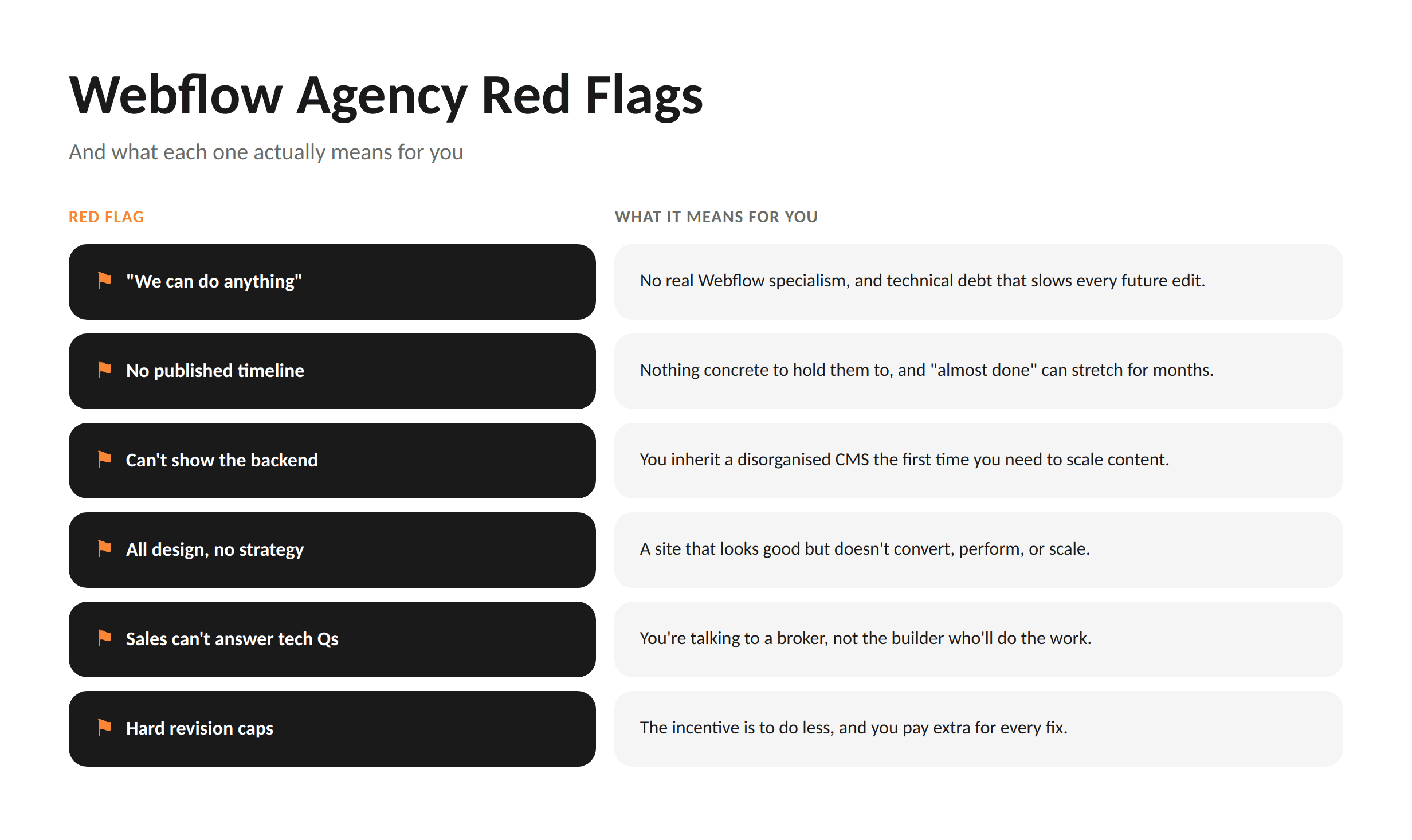
Some warning signs predict a bad engagement before you ever sign. Watch for these:
"We can do anything." A team that specialises in nothing is rarely excellent at Webflow specifically. What it means for you: slower builds, weaker CMS conventions, and technical debt that slows every future edit.
No published timeline or phased plan. What it means for you: you can't hold them to anything, and "almost done" can stretch for months.
They can't show you the backend. If an agency won't walk you through the CMS structure of a real project, they may be hiding disorganised work. What it means for you: you inherit the mess.
The pitch is all design, no strategy. If nobody talks about how the site will perform, convert, or scale, that's a warning. What it means for you: a pretty site that doesn't move the numbers.
No one on the call can answer technical questions. If the salesperson keeps saying "I'll check with the team," you're talking to a broker, not a builder.
They pressure you to sign fast. Good agencies have a pipeline and can wait a week. Urgency is a sales tactic, not a reason.
Restrictive revision caps with paid overages. What it means for you: the incentive is to do less, and you pay for every fix.
12 Questions to Ask in the Discovery Call
The discovery call is a two-way test. You're not just being sold to, you're watching how the agency thinks. The quality of their answers predicts project success better than any portfolio.
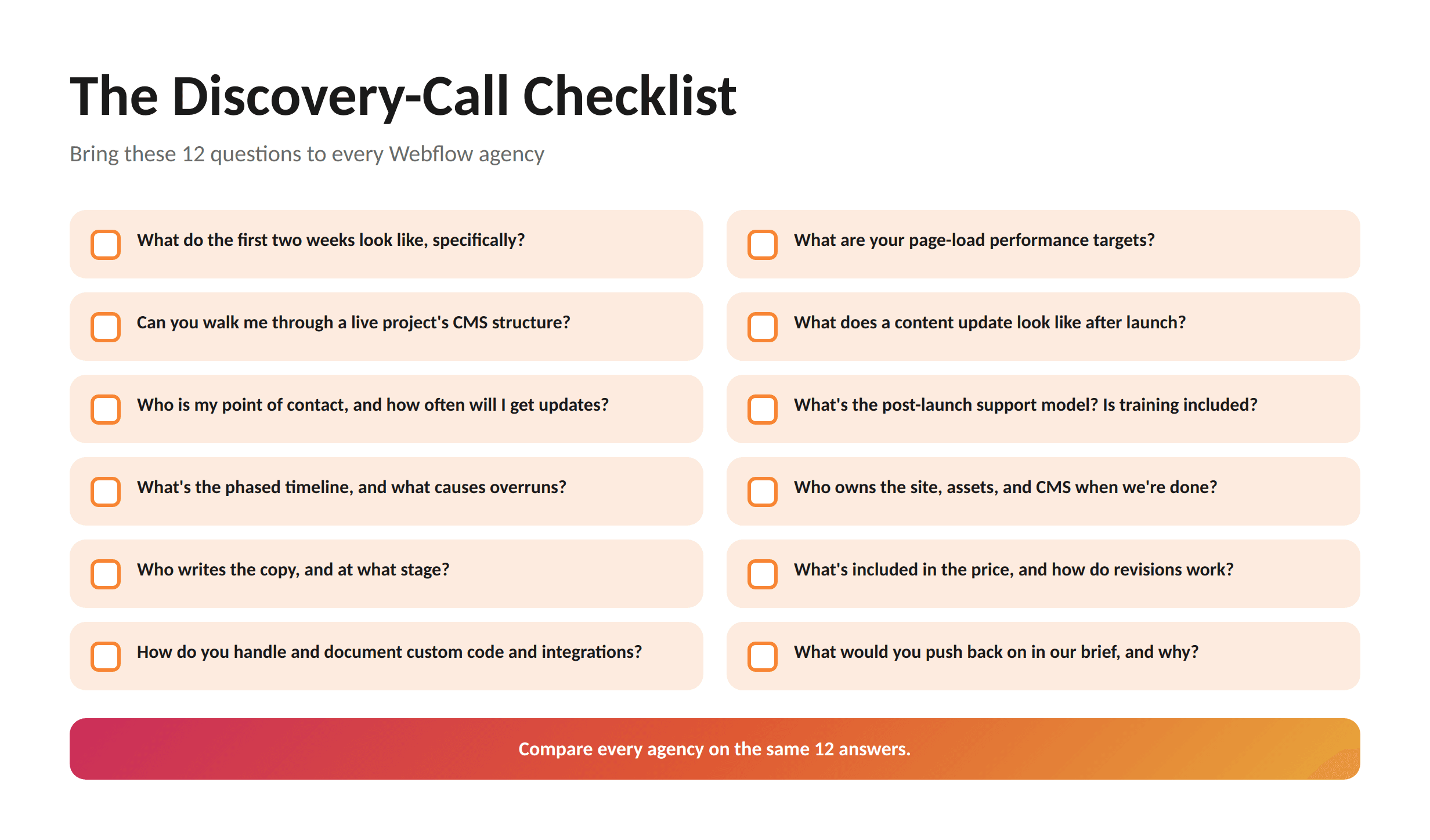
Bring this checklist. Strong partners welcome these questions and answer them with specifics; weak ones reach for vague reassurance.
What do the first two weeks of the project look like, specifically? Good answer: a concrete discovery-and-wireframe sequence, not "we'll get started."
Can you walk me through the CMS structure of a live project you've built? Tests whether the backend is organised.
Who is my single point of contact, and how often will I get updates? Tests communication discipline.
What's your phased timeline for a project like ours, and what most often causes overruns? Tests honesty about scope.
Who writes the copy, and at what stage? Catches a common gap that stalls projects.
How do you handle custom code and integrations, and how do you document them? Tests technical depth.
What are your page-load performance targets? Good answer references Core Web Vitals.
What does a typical content update look like for my team after launch? Tests whether you'll be self-sufficient.
What's the post-launch support model, and is training included? Tests what happens after handoff.
Who owns the site, assets, and CMS when we're done? The answer must be: you do.
What's included in the price, and how does your revision policy work? Tests pricing transparency.
What would you push back on in our brief, and why? The single best question: it reveals whether they think, or just take orders.
Want a discovery call worth your time?
Bring these 12 questions to WSA, you'll get specific answers, not a pitch deck.
It's fair to hold WSA to the same eight criteria. Here's how WSA approaches each one, honestly, including where the standard signal doesn't apply.
1. Partner/Expert status. WSA doesn't lead with a directory badge. Instead, WSA proves Webflow fluency the way the badge is meant to certify it: through the CMS architecture and class structure in real projects you can inspect before you commit.
2. Portfolio and backend. WSA will walk you through the backend of live builds, not just the visuals: CMS collections, components, and a maintainable class structure your team can actually work with. Our case studies show the problems solved, not only the pixels.
3. Timeline and scoping. WSA scopes in phases with deliverables and a realistic schedule, and is upfront about what drives overruns (usually content readiness and feedback delays), rather than promising an unrealistic launch date.
4. Tech stack. WSA builds Webflow front ends with documented custom code and clean integrations: analytics, CRM, and the compliance-grade forms fintech and regulated clients need.
5. Communication. You get a clear point of contact and a repeatable process (discovery, design, development, QA, handoff) with a defined update cadence.
6. Post-launch and ownership. WSA hands over full ownership, includes training so your team can manage content independently, and offers a clear post-launch support path.
7. References and results. WSA connects you with relevant work and frames outcomes in concrete terms, not adjectives.
8. Pricing and revisions. WSA works in transparent, fixed-price packages, design, development, copy, and launch in one number, with a revision approach that doesn't punish you for iterating.
WSA also specialises in fintech, forex, crypto, and Web3 web design through its Webflow development services. If your project is specifically a crypto or Web3 build, the dedicated guide on choosing a Webflow agency for a crypto or Web3 project goes deeper on that niche. And if budget is your first question, see what a Webflow build costs before you brief anyone.
FAQ
What is the difference between a Webflow developer and a Webflow agency?
A Webflow developer is usually an individual who builds and implements sites, while a Webflow agency is a team that combines strategy, design, development, and project management under one roof. A freelance developer can be the right call for a focused, lower-budget build, such as a single landing page. An agency makes more sense when you need brand strategy, copy, complex CMS architecture, integrations, and someone accountable for the whole project rather than one slice of it. The trade-off is cost and coordination: agencies cost more but reduce the risk of gaps between design and build.
Should I hire a Webflow Certified Partner or a regular agency?
A Webflow Certified Partner has been reviewed by Webflow against its standards, which is a useful signal, but it isn't the only one that matters. The Partner directory is a good place to verify that a team genuinely works in Webflow rather than just claiming to. That said, the badge is a floor, not a guarantee of fit. Plenty of strong agencies demonstrate expertise through their portfolio, CMS architecture, and client results instead of a directory listing. Judge the work and the process, not only the label, and always ask to see the backend of a real project regardless of badge status.
How long does it take a Webflow agency to build a website?
A typical mid-complexity Webflow website takes roughly 6 to 11 weeks from kickoff to launch. That spans discovery and strategy, design, development and CMS setup, integrations, and QA before go-live. Simple one-page sites can be faster; large, integration-heavy, or multi-language builds take longer. Timelines commonly slip for non-technical reasons, such as content that isn't ready or slow feedback rounds, so a good agency flags those risks early and builds buffer into the plan. Be cautious of anyone promising a fully custom, strategy-led site in a week or two.
How much does it cost to hire a Webflow development agency?
Custom Webflow builds typically range from around $3,000 for a simple site to $100,000 or more for enterprise projects, with boutique agencies often starting in the $10,000-$25,000 range. The price depends on page count, CMS complexity, custom design, integrations, and how much strategy and copywriting is included. Watch for what a quote excludes: Webflow hosting, ongoing content, and integrations beyond the standard stack are often separate. Fixed-price, all-in packages make budgeting predictable; hourly arrangements can hide overruns. Decide your scope first, then compare like-for-like proposals.
What questions should I ask before hiring a Webflow agency?
Ask about process, proof, and what happens after launch. The most revealing questions are: what do the first two weeks look like; can you walk me through a live project's CMS structure; who is my point of contact; what's the phased timeline and what causes overruns; how do you handle custom code and integrations; what's the post-launch support model; who owns the site when we're done; and what would you push back on in our brief. Strong agencies answer with specifics and welcome the scrutiny. Vague reassurances are themselves an answer.
Ready to evaluate WSA?
Put us through your eight criteria and twelve questions, no pitch deck, no obligation.
Conclusion
Knowing how to choose a Webflow agency comes down to looking past the homepage. The agencies on your shortlist will all look capable. The ones worth hiring are the ones that can show you the backend, give you a phased timeline, answer hard questions on the call, and hand you a site you actually own.
Run every candidate through the same eight criteria and the same twelve questions. Compare them on evidence, not charisma. Do that, and the decision to hire a Webflow developer or agency stops being a gamble and becomes a straightforward call.
When you're ready to put a specialist team through that test, WSA is happy to take it.
Launch Your Licensed Brokerage with Confidence
We support brokers and fintechs through licensing, launch planning, and everything a regulated brand needs to go live.